Define Containers and fields
Containers belong to a project and describe structured collected data. Open Containers to manage the definitions and their fields. This screen edits definitions; use Data to browse saved records.
Create a definition
Section titled “Create a definition”- Add a Container in the definitions list.
- Enter its name and configure available key/history options.
- Save the row.
- Select the Container and add its fields in the adjacent fields list.
- Save each field using the row’s explicit Save command.
Use Cancel to discard a row draft. Existing data is not rewritten just because a definition or default changes.
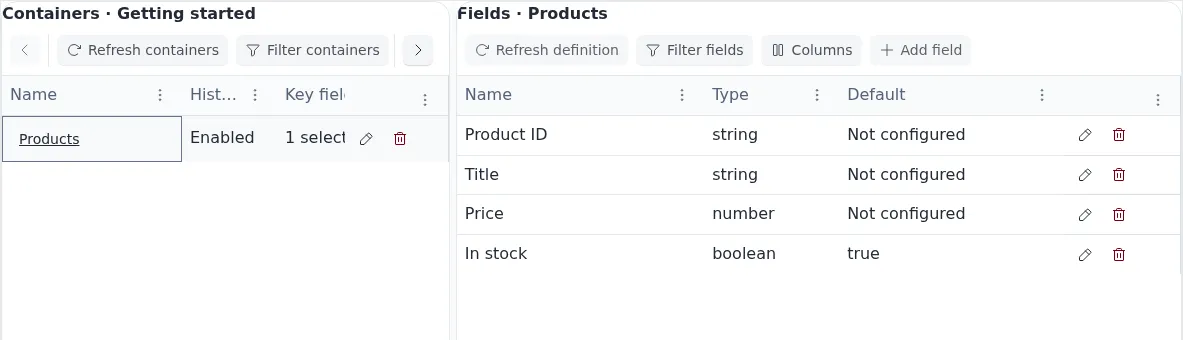
Example definitions with demonstration data: select a Container on the left to manage its fields on the right. In stock has a default of true; the other fields have no configured default.
Field paths and values
Section titled “Field paths and values”A field has a stable identity and saved path. Treat path segments as exact names: a dot in a name is not automatically a nested path. Saved field paths cannot be renamed through ordinary editing.
Choose a logical type appropriate to the information. A default fills an absent field; it does not replace explicit false, 0, empty text or null. Collection does not silently convert every string into the declared type.
Use a declared field when you need a predictable schema. Dynamic collection has separate authoring semantics; do not assume it creates new declared fields automatically.
Keys identify records that should be updated rather than appended as unrelated observations. Choose stable scalar values, such as a source item identifier. Missing, null, empty or structured key values cannot be used as a valid collected key. Zero and false remain real values.
For keyed updates, omitted fields can preserve an existing record value. A default should not be used as a substitute for understanding that merge. Test with a small sample before collecting into an established dataset.
History and changes
Section titled “History and changes”History-enabled data retains the available record evolution. Definition editing does not migrate all existing records, recalculate values or create a new source snapshot.
Deletion and retirement commands have different effects from deleting records. Read their confirmation and references. Computed fields and advanced index management are not documented as available customer workflows.